

A few tips on managing Linux Servers

this will be a post on my collection of Linux commands which I find handy, in the various scenarios.
Check for Operation System Information
hostnamectl
uname -r
free -m
top
htop
Investigate what are the listening ports
sometimes there is something already running on the port, that you're unable to start your program.. here's some way to find them.
sudo lsof -i -P -n
sudo lsof -i -P -n | grep LISTEN
sudo lsof -i :3000
kill -9 <PID>
Some SU / SUDO Tips
sudo -i. (switch to root user)sudo !!(execute the previous command as sudo)su -sets up the shell environment as if it's new loginsujust start shell as that user, use 'original user's environment settings.
and well... another tip cd - change directory back to the previous directory
What if we want a User that act like the Root Id, at the meanwhile not using sudoer file?
this is another trick to set a account to be 'root' by changing its iD
uname check operating system
list existing users view /etc/passwd
assign ID with root equivalent privileges by changing the current UID value of the new ID to UID=0
Want a more efficient way to Copy files, Compare difference then only sync those?
Try rsync!
Rsync is a useful utilities native to the linux environment. It has a parameter n to allow one to have dry-run session first to observe the verbose output.
A sample of a rsync command.
rsync -razvh --delete --exclude doc /data/source /data/destination
this runs recursive manner into the folder below, remove the files on the destination mirroring the source, and exclude target 'doc' pattern folder/files.
you could find more about this command from the manual or internet too. So something to consider along with sftp, ftp, scp ...
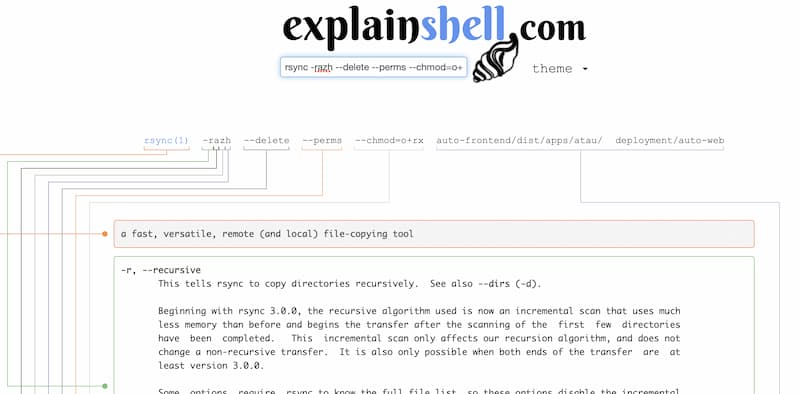
What about sometimes we want to understand what a set of commands does?
just copy-paste the command onto https://explainshell.com/ I wish I would have discovered this earlier. My early days of learning the unix/linux command was to dig through the 'manual' from 'man' or 'help' to see what each parameter does and arguments are for.
I think this is not exhaustive list yet. just some of extract from my note. Perhaps you may share with me your favourite commands in linux in comment below too.
About the author
I'm a Full Stack Developer, Software Architect, and Aspiring Technopreneur, looking to fuse entrepreneurship and technology to deliver quality-of-life improvement products.
Comments
Join the discussionNo comments yet. Be the first to comment.


